Operations · Kitchen display
No refresh button, because there is nothing to refresh.
The instant an order is accepted, its ticket is pushed to the kitchen screen over a WebSocket. The card tints as the clock runs on it, the station filters keep each pass to its own work, and one tap tells the floor the food is up.
Pushed, not polled·aging tint·station routing·item-level ticking·runs on a TV
Green under five minutes. Red past fifteen.
Every live ticket, with the table or channel it came from, the age it has reached, the order-level note that applies to all of it and the item-level note that overrides that note for one dish.
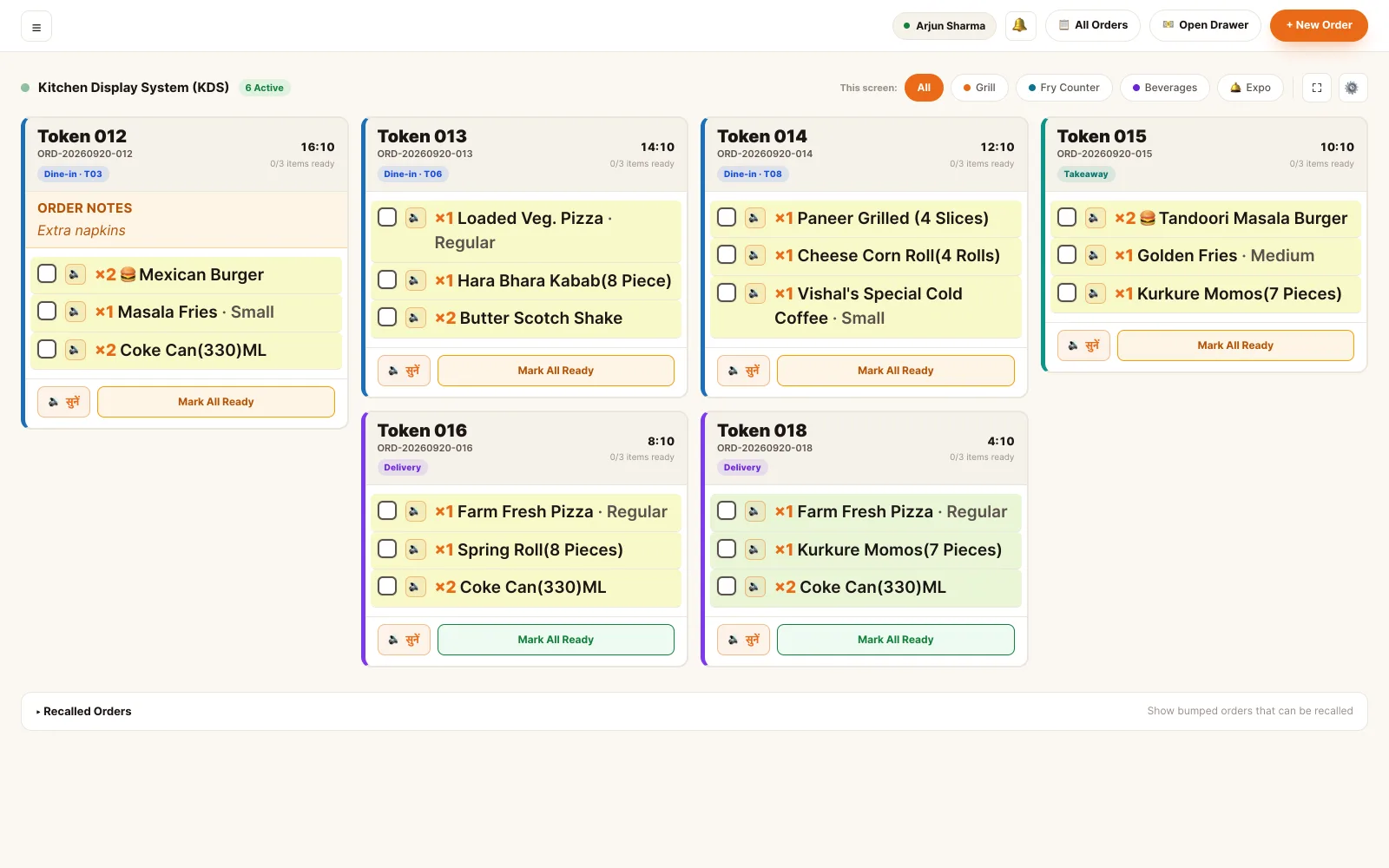
Kitchen display · live board and bumped tickets
Built for a room where nobody has a free hand.
Large type, few controls, one colour that means "this one has waited too long". The board is read from across a kitchen, not leaned over.
Pushed, not polled
A WebSocket connection carries the ticket the moment the order is accepted. Nobody reloads a page to find out whether an order came in.
The card tints as it ages
Green under five minutes, amber to fifteen, red beyond. The oldest ticket is the loudest thing on the screen without anyone sorting anything.
One board, or one station
Filter to tandoor, main kitchen, bar or desserts, and each pass sees only the work that belongs to it — on its own screen if it has one.
Tick items, not just tickets
Mark a single dish done as it leaves the pass. The ticket only closes when the last line on it is accounted for.
One tap tells the floor
Marking ready reaches the waiter's phone and the diner's tracking page in the same second — over the same live connection.
Any screen, including a TV
It is a web page, so it runs on a tablet at the pass, a laptop in the office or a television on the kitchen wall.
Half the table's order is going home with them.
A dine-in order where some items are eaten at the table and some are packed stays one order, one bill and one token — but the board splits it into two labelled sections so each can be sent when it is actually done.
- Serve-at-table and pack-to-go grouped inside a single card, not split across two tickets
- Each section can be marked ready on its own — the hot plate goes out while the parcel finishes
- The order only counts as ready once both sections are
- Station filters keep tandoor, main kitchen, bar and desserts on their own screens
- Order-level notes apply to every item; an item-level note replaces them for that dish only
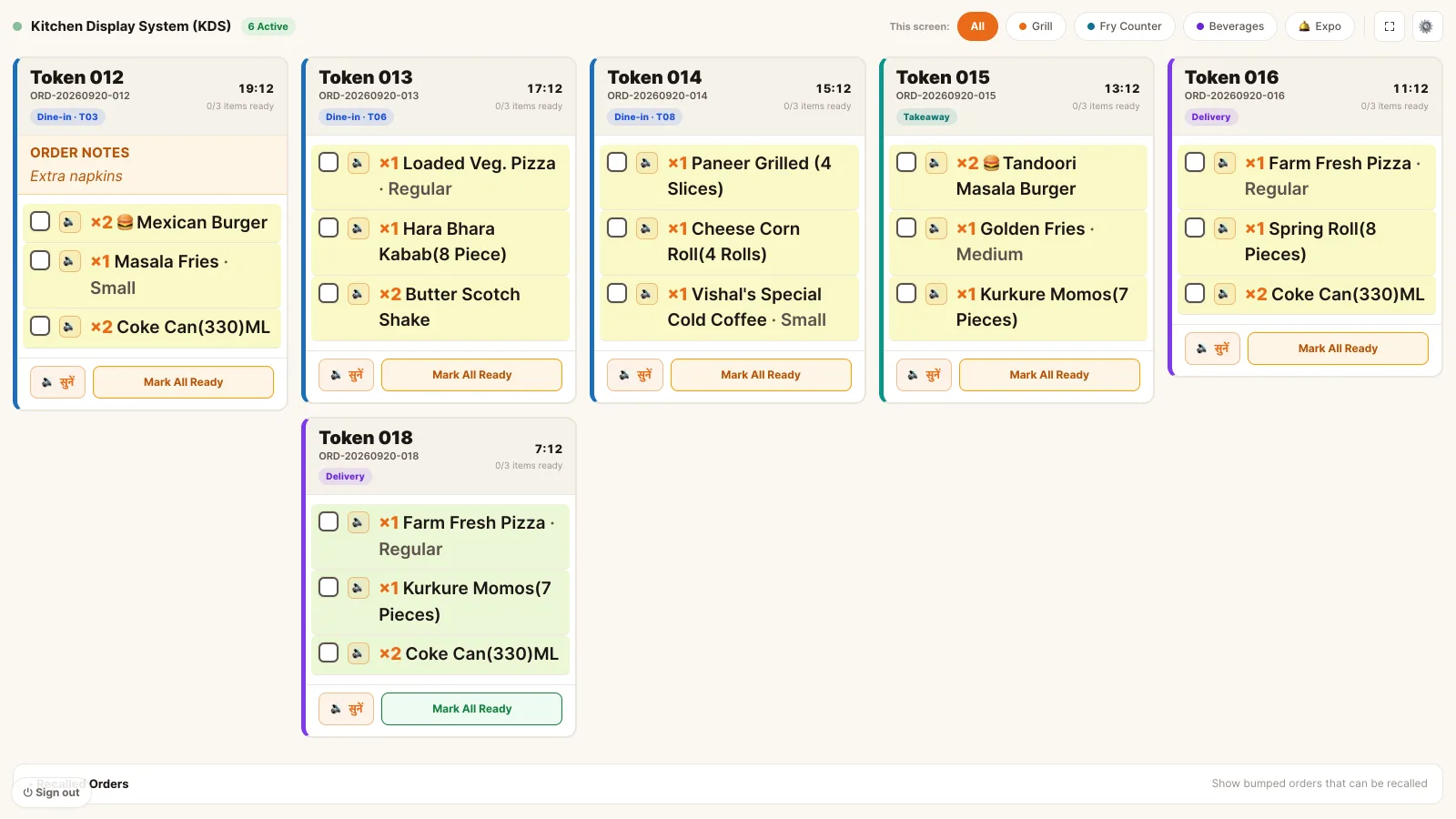
Kitchen display · one station, split ticket
The kitchen should not have to ask where it came from.
A table, a QR scan, a kiosk, a delivery partner and a car in the drive-in lane all become the same card. What changes is the one line that says where the food is going.
- Dine-in shows the table; takeaway shows the pickup; delivery shows the channel and the customer
- A drive-in ticket leads with the car number, because that is how the runner finds them
- Where auto-accept is on, an order reaches the board without anyone pressing accept; where it is off, it waits for a person
- A sound alert on a new ticket, for a kitchen that is not watching the screen
- How long a bumped ticket lingers before it clears is a setting, not a fixed behaviour
- 1× Chicken Biryani
- 1× Sweet Lassi
- 1× Palak Paneer
- 2× Garlic Naan
- 2× Masala Dosa
- 1× Masala Chai
- 1× Rogan Josh
- 1× Veg Biryani
- 2× Gulab Jamun
Kitchen display · dine-in, QR, kiosk, drive-in and delivery
The board is a view, not a copy.
Nothing is exported to the kitchen screen and nothing is typed back off it. It reads and writes the same order the counter is looking at.
Kitchen staff see the kitchen, and only that.
The screen at the pass is logged in as a kitchen account. It carries no prices, no customer details and no way into billing.
- Kitchen staff The board and nothing else. Tick items, mark a ticket or a section ready, switch stations. No revenue figures, no customer contact details, no access to bills.
- Head chef Runs the pass. Everything kitchen staff can do, plus the recipe and menu side that decides what the ticket says in the first place.
- Waiter Reads it, mostly. Checks where an order has got to rather than walking to the pass, and is notified the second a dish is marked ready.
- Supervisor Unblocks it. Watches the aging tickets, re-fires a dish, and handles the order that has been red for twenty minutes.
- Manager · Owner Sets the rules. Which stations exist, whether orders auto-accept, whether the sound alert is on, and how long a bumped ticket stays on the board.
Permissions are atomic and checked per endpoint. A role is a bundle of them, not a rank — staff hold several at once and their effective access is the union.
See it running on your menu.
We set the restaurant up with you — menu, tables, staff and printers — rather than handing over a login and wishing you luck.