Notifications
The restaurant speaks in its own name.
Order confirmed, food ready, rider on the way, table booked, bill attached — sent on WhatsApp from the restaurant's own number, triggered by the order itself. Nobody on the floor types a message.
Your own number·fired by order events·every message kept on the customer·charged only when delivered
What the diner actually receives.
One conversation, from the restaurant's number, built out of things that happened in the system. On the right, the event that fired each message.
WhatsApp · the thread on the diner's phone
Six things this module actually does.
Order confirmation
The moment the order is accepted the customer gets the items, the total and the table or the address — from your number, not a shortcode.
Ready and delivery alerts
Bumping the ticket on the kitchen screen tells the diner. Dispatching a rider sends the rider's name and an ETA.
The bill as a message
Settling the bill sends the GST invoice as a PDF attachment, so the customer keeps the receipt without a paper slip.
Reservation reminders
A confirmation when the booking is made and a reminder before the slot, with the party size and the time on it.
Campaigns to a segment
Send an offer or a festival greeting to a saved segment — only to customers who opted in, with a per-campaign budget that stops it mid-way if exceeded.
Templates you control
Edit the wording of every automatic message, insert variables like the order number or the total, and switch individual triggers off.
Every message, and what happened to it.
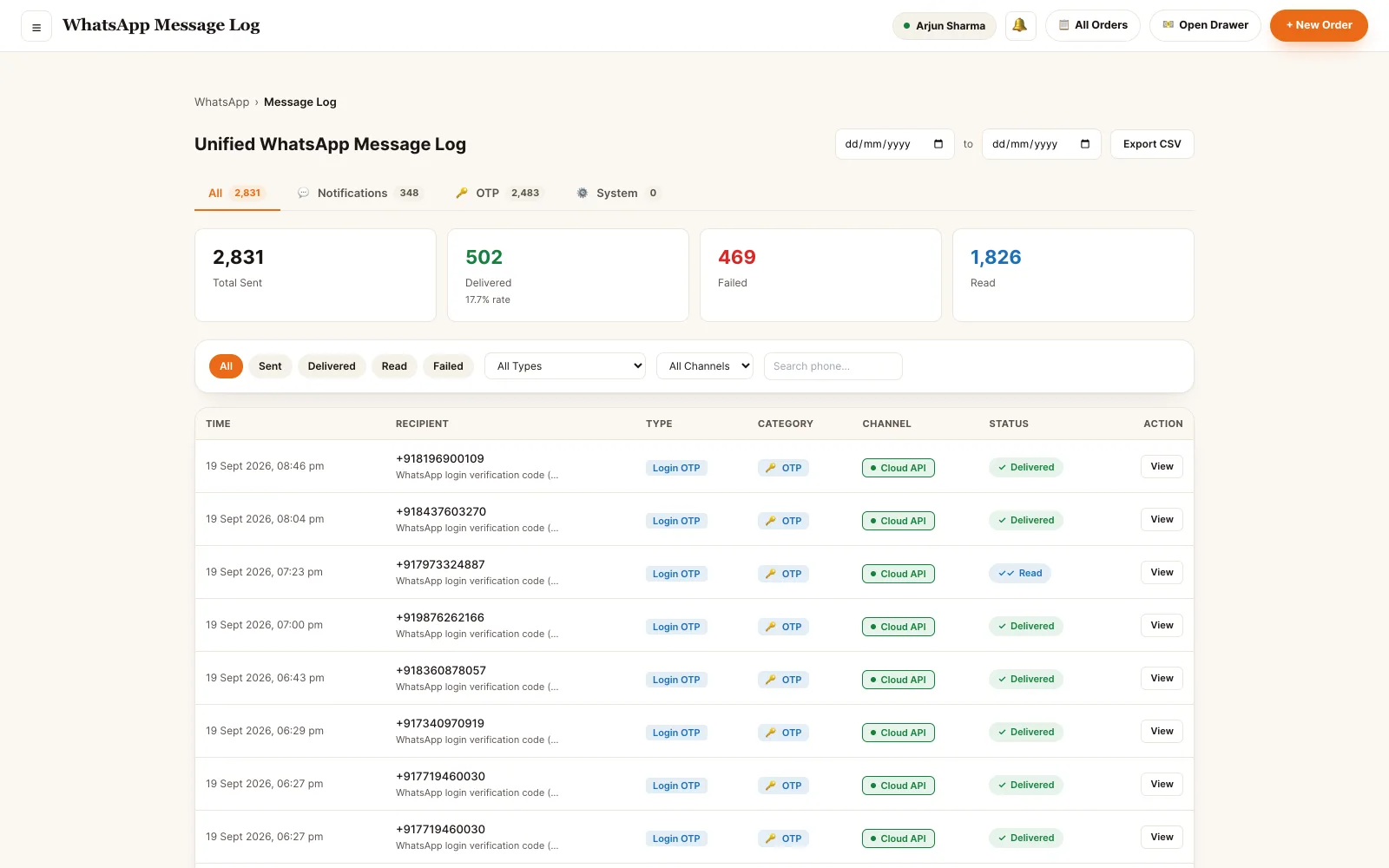
One log for the whole tenant: what was sent, to whom, by which trigger, and whether it was accepted, delivered, read or failed. When a customer says they never got the confirmation, you can answer.
- Sent, delivered, read and failed — the real receipt from the messaging provider
- Filter by category: order notification, reservation, campaign, login code
- Open a message to see the exact body that went out and the failure reason
- The same messages appear on the customer's own record in the CRM
- Failed messages are never charged — the credit is released back
Back office · unified message log
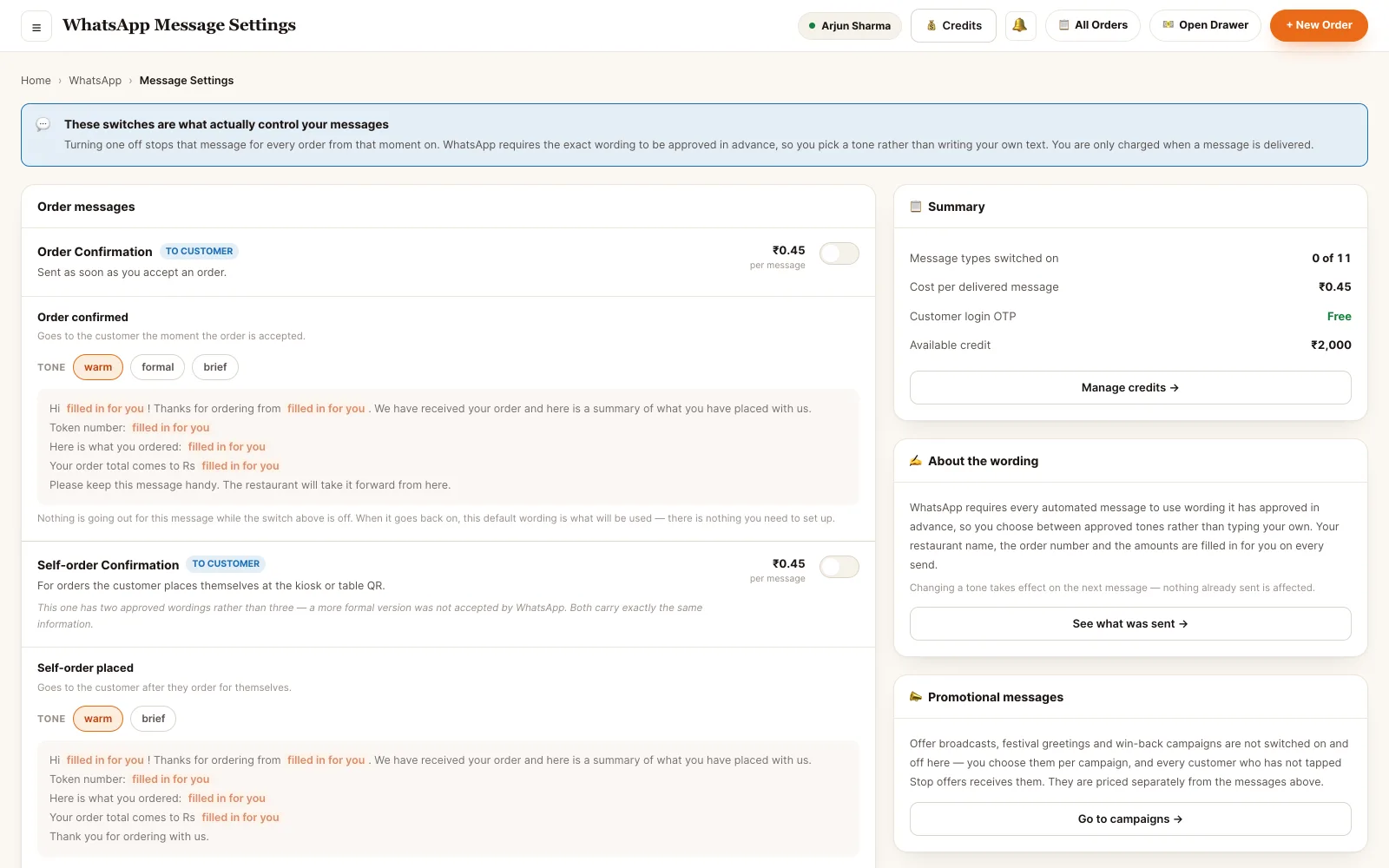
Back office · template editor and credits
Your wording, your budget.
Every automatic message is a template you can edit, with variables pulled from the order. Messaging runs on prepaid credits, and you are charged only for a message that is actually delivered.
- Edit the body of any template and preview it as the customer will see it
- Insert order, customer, bill, rider and reservation variables by name
- Switch an individual trigger off without touching the rest
- Campaigns carry a budget; a campaign that would exceed it stops rather than overspends
- Sign-in codes are not charged to you, so a diner can always log in
Nothing here is typed by hand.
Each message is a consequence of something that happened elsewhere in the platform.
Who can send in the restaurant's name.
- OwnerOwns the number and the spend. Connects the WhatsApp number, edits every template, recharges credits, and approves campaigns.
- ManagerRuns the messaging. Creates and sends campaigns to a segment, edits template wording, switches triggers on and off, reads the full log.
- SupervisorChecks what went out. Reads the log and re-sends a failed order notification — without editing templates or spending credits on a campaign.
Permissions are atomic and checked on every endpoint — a role is a named bundle of them, not a rank. Staff can hold several bundles at once, and effective access is the union.
See it running on your menu.
We set the restaurant up with you — menu, tables, staff and printers — rather than handing over a login and wishing you luck.