Restaurant POS software · counter · floor · kitchen · bill
Restaurant POS software that keeps the counter, the floor and the kitchen on the same order.
Tadka Tech is restaurant POS software for restaurants, cafés, QSRs and cloud kitchens in India. An order taken at the counter, on a waiter's phone, from a table QR code or at a kiosk becomes one order: it reaches the kitchen screen or a printed KOT, closes as a GST bill made from its own lines, and every screen sees the same order the moment it changes.
Where a restaurant POS loses the order — and what Tadka Tech does instead.
An order passes through four or five hands between the guest and the bill. Each card below is one of the places it usually breaks, followed by what happens on Tadka Tech.
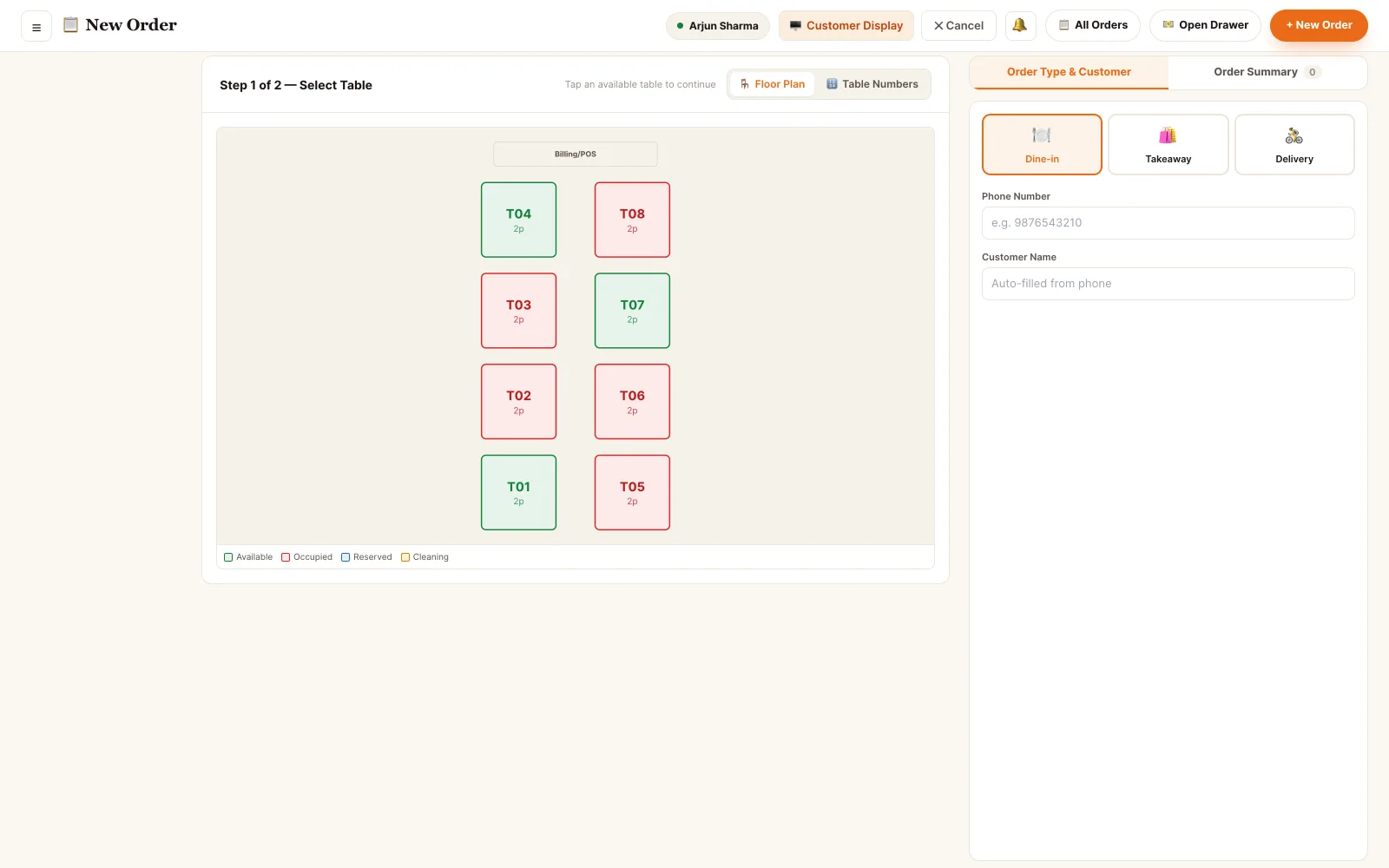
“It's his second day. He can't find the dish in a 200-item menu.”
TadkaTwo or three letters are enough: the first letter of each word works too, so “pbm” brings up Paneer Butter Masala. Sizes are asked before the item goes into the cart, so a half plate can't be billed at the full price.
Order Management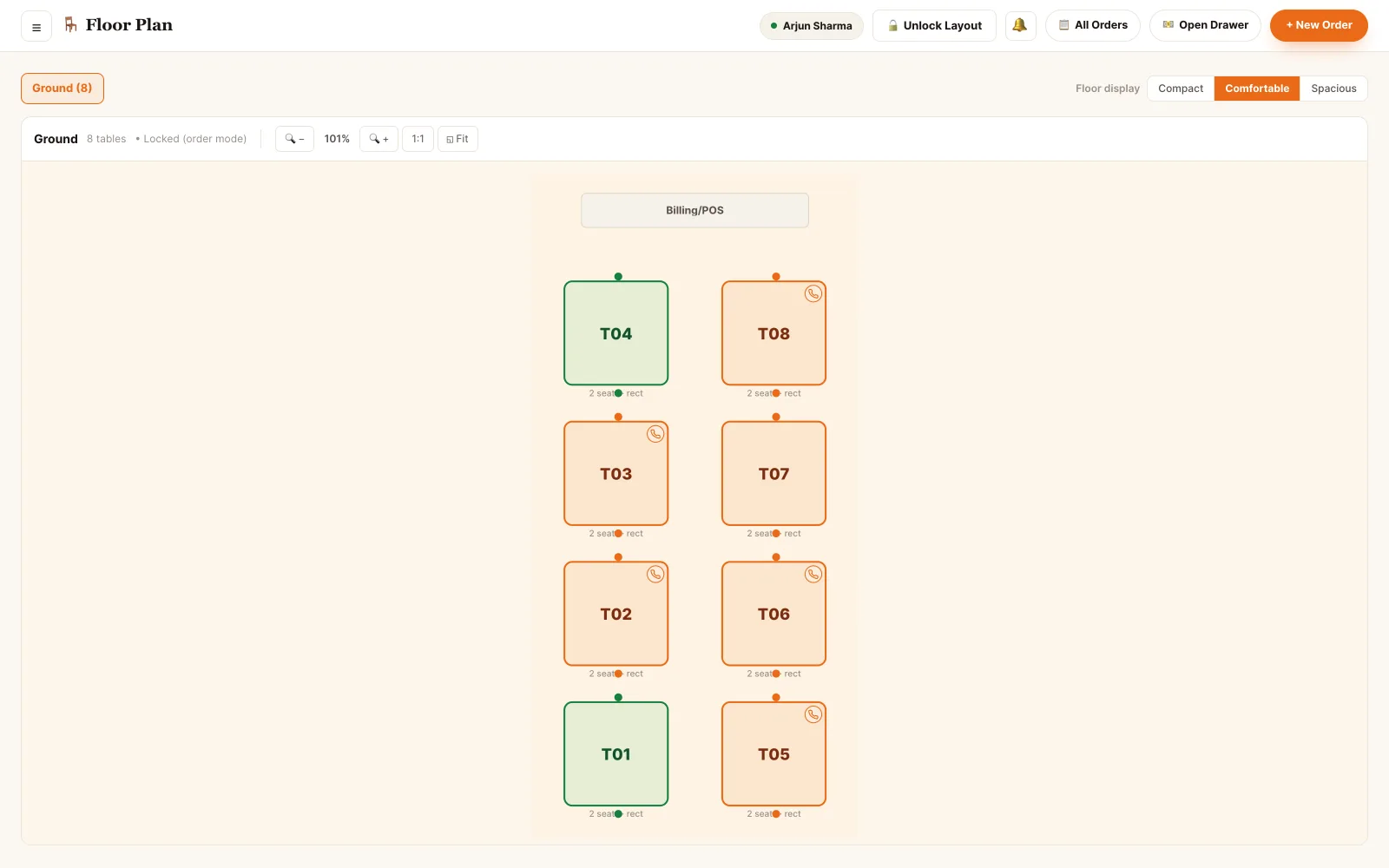
“The sun is in their eyes. They want the table by the wall.”
TadkaTap Move and pick a free table; occupied ones are greyed out. The whole order, items, kitchen work and bill, moves with the guests, and the old table frees itself.
Table Management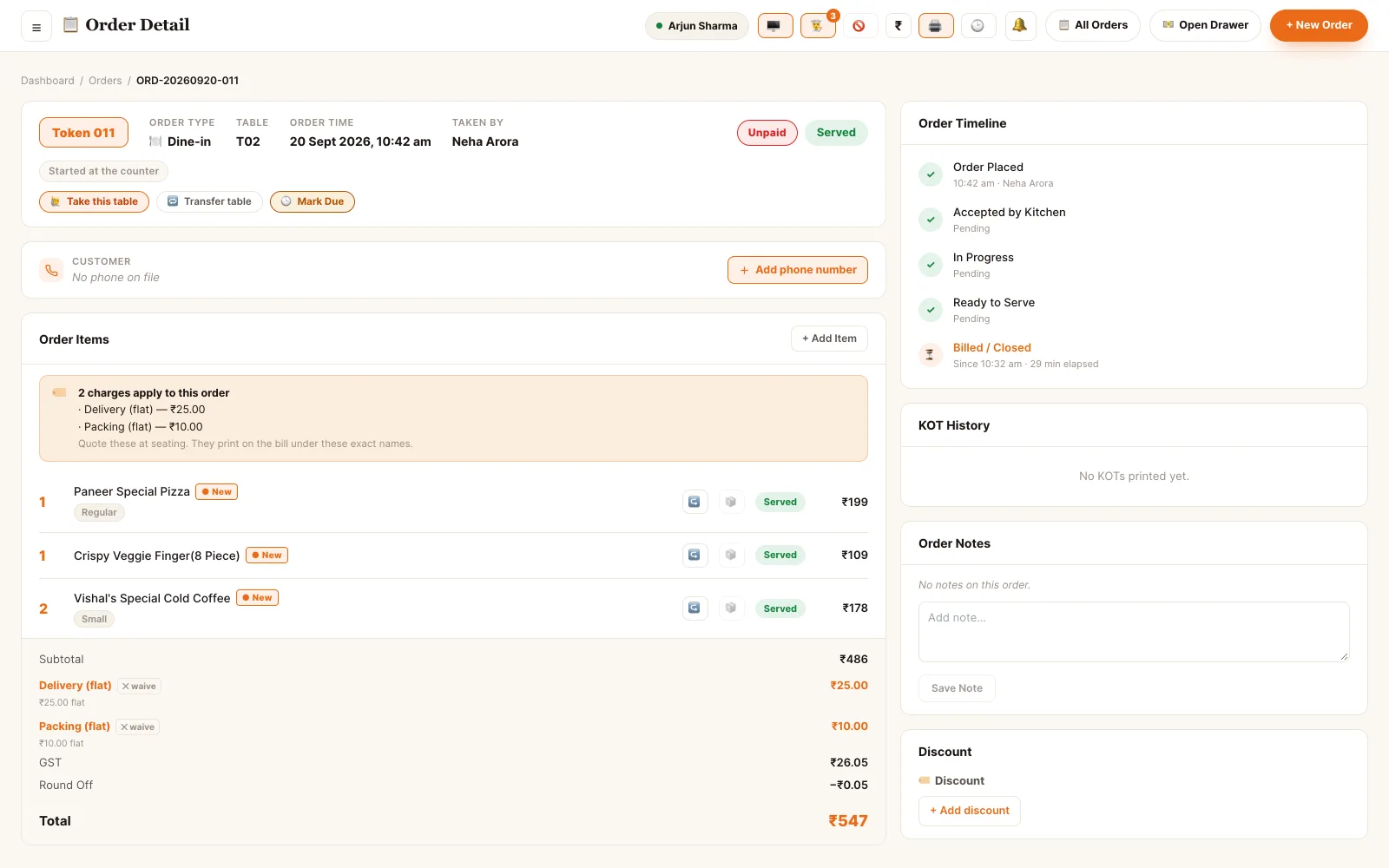
“The waiter punched the fries on T02. T06 ordered them.”
TadkaMove item on that one line sends it to the right table: it joins that table's running order, or starts a new one on a free table. Nothing is cancelled and nothing is punched again.
Order page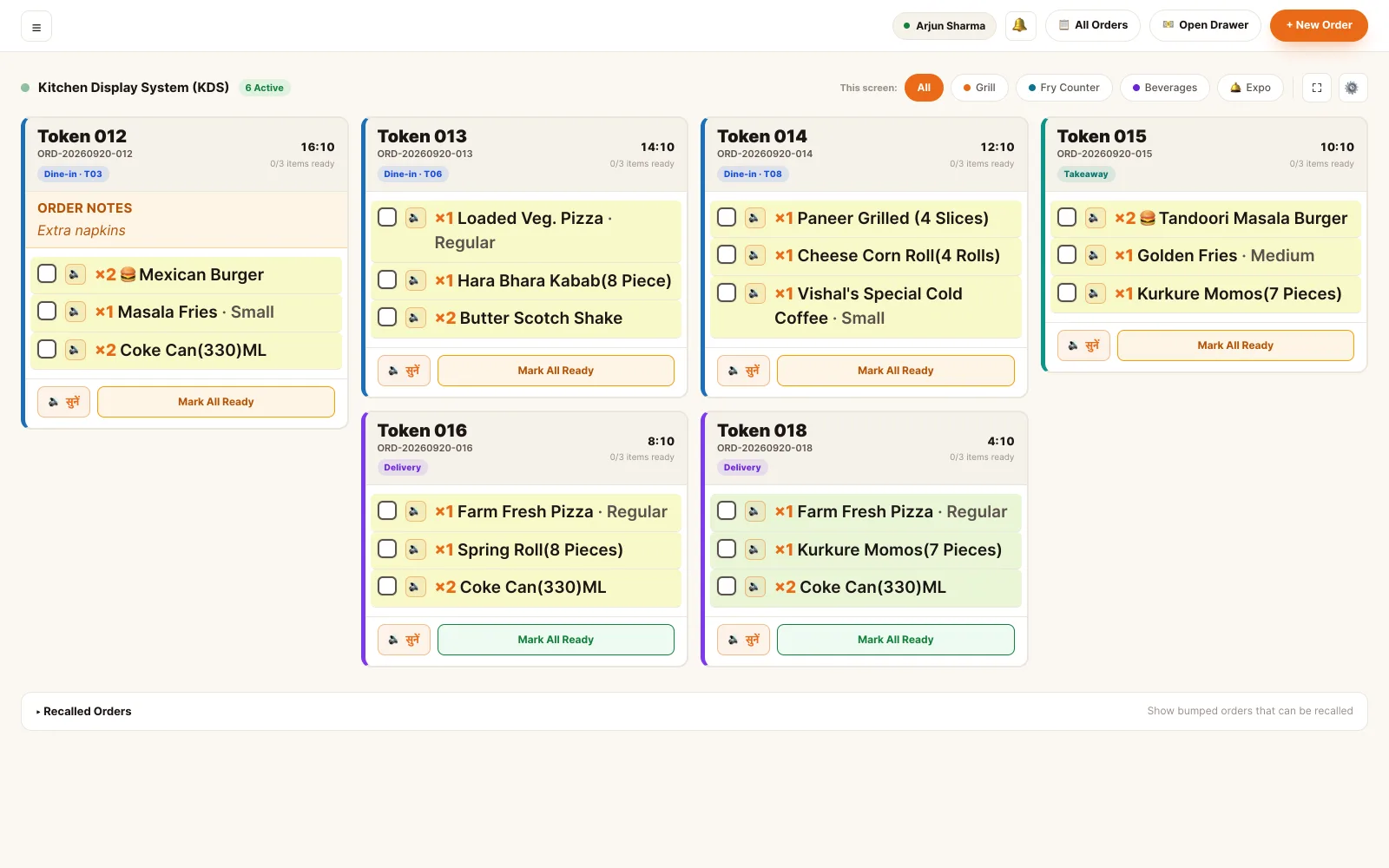
“They added one Coke, and the kitchen started the whole order again.”
TadkaItems added later go out on an add-on KOT with only the new item. On the kitchen screen it joins the same card with a New tag, so nothing is cooked twice.
Kitchen display“Not the pasta. Make it a pizza puff.”
TadkaReplace works until the kitchen starts that dish. The price difference is worked out for you and a reason is required, so a swap never becomes a silent discount.
Order Management“They took a call and left. The burger was already made.”
TadkaVoid Order ticks what the kitchen already cooked and records it as wastage; what was never made costs nothing. The Voided Today card shows the count and the money lost, every day.
BillingOne lunch rush, every button on the board.
A Sunday afternoon with six of eight tables full, two takeaways and a delivery in the queue. A table moves, an item lands on the wrong bill, a dish is swapped, a family walks out and a payment is recorded the wrong way. Each one is fixed from the orders board or the order page.
How a restaurant POS should carry one order, from the first tap to the last rupee.
- Take itAt the counter, a table from your own floor plan. Dine-in, takeaway or delivery each ask for what they need: delivery won't start without a map address and a phone number. A delivery-only kitchen doesn't see dine-in at all, and a drive-in counter gets a type that asks for the vehicle number.
- At the tableOn the waiter's own phone. One tap sends only the new lines; anything already fired is never sent again.
- Guests themselvesFrom the table QR or the kiosk. Your payment rule decides whether the order cooks at once or waits at the counter until it is paid.
- Cook itA card with the token, the table and a running clock. Serve-at-table and pack-to-go items sit in separate parts, and each item is ticked as it is made.
- Bill itThe bill is built from the order, never retyped. GST on the value after the discount, then cash, card, UPI or a split, or part now and the rest on udhaar.
- Prove itThe order's history. Who added what, which table the fries went to, when each KOT printed and how the money came in, with a name and a time on every line.
What to look for in a restaurant POS — and how Tadka Tech answers.
Nine questions that separate a POS that prints bills from one that runs the service. Ask them of every system on your list; our answers are on the right.
One queue
Do orders from every channel land in the same place?
Order Management
Changes after firing
Can the kitchen tell a new ticket from a copy?
KOT software
The floor
Does the table plan match the room, and stay right by itself?
Table Management
A record
When a guest disputes the bill next week, what do you look at?
Fixing money
Can a wrong payment be corrected without deleting a sale?
Restaurant billing software
Who sees what
Does each person see only the screen they need?
Staff Profiles
Devices
Do you have to buy new hardware?
The apps
Printing
Does a KOT print without a dialog box every time?
Switching
How long until real orders run on it?
Switching from another POS
A POS for a team, not one cashier.
Real counters are shared. Four waiters on one tablet, a shift that ends mid-meal, a manager covering the till.
- My orders only fades other people's tables on a shared tablet, so each waiter finds their own
- Transfer table hands a table to another staff member, and every transfer is recorded
- Each device keeps its own order of buttons on a table tile: Receipt first on the counter, KOT first on a waiter's phone
- Forty tables over three floors? Switch from the map to numbered boxes, remembered per device
The queues below the floor.
Takeaway and delivery sit under the floor plan on the same board, each row with its token, customer, amount, paid or not, and kitchen progress.
- Delivery rows add Assign Rider, and a paid, finished takeaway moves into history by itself
- Every order carries a strip that turns red once it is late; tap the late count and everything else dims
- Tables free themselves after payment and the kitchen's last tick, after the minutes you choose
- Small counter: auto-print the KOT and the bill. Big kitchen: keep both off and print with one button
Restaurant POS software for Android, Windows and Mac
The counter and the back office open in a browser on a Windows or Mac laptop, or on a tablet. Waiters use their own phones and the kitchen uses a wall screen. Because every one of them works on the same live order, Tadka Tech needs an internet connection; keep a mobile hotspot ready in case the line goes down.
Restaurant POS software: questions owners ask.
What is restaurant POS software?
Which is the best restaurant POS software in India?
Can the counter, the waiters and the kitchen use the same POS?
Can I change an order after it has gone to the kitchen?
Do I need to buy special POS hardware?
Does the POS keep working if the internet goes down?
How long does it take to start using Tadka Tech?
Each part of the POS, up close.
Captain app
The waiter's phone: sections, ordering at the table, a bell when the food is ready, and tips.
Read moreKOT software
Printed KOTs, the kitchen screen, stations and timers.
Read moreRestaurant billing software
GST bills, split and UPI payments, udhaar and the day close.
Read moreWhatsApp us a photo of your menu. Live in 48 hours.
We move your menu across free, set everything up and train your staff, and you get up to 6 months free. How many months are free depends on the plan you choose; after that, you pay that plan's regular price.